Every step lights the way.
Fokus IO is a thirty-day focus habit for Android. Reach your daily goal and the day lights up. Miss it, and it stays ash.
Free to start, no ads, no account needed. Android 7 and up.
Decide what a good day is.
From fifteen minutes to four hours of focus. Then give the flame a length. Try it: drag the ring, press start.
-
Let it burn
The flame burns with the clock. Ending early takes a hold, not a tap, and if your phone dies halfway the minutes still count when it comes back.
-
Light the day
Reach your goal and today’s lantern lights on the path. Miss a day and it turns to ash. It doesn’t come back, which is exactly why it works.
Sped up for the demo: a minute takes a fraction of a second here.
Thirty days, five landmarks.
Landmarks count lit days, not dates. Miss a day and they wait for you a little further up the path.
A lit day never goes out, even if you lower your goal later.
-
Ignition
Day 1. Day 1 burns. The path is lit.
-
First Light
Day 7. Seven days burned. The habit has caught.
-
Steady Burn
Day 14. Two weeks of fire. It holds even when you don’t feel like it.
-
Unbroken
Day 21. Twenty-one days burned. This is who you are now.
-
Luminary
Day 30. Thirty days. The whole road is lit.
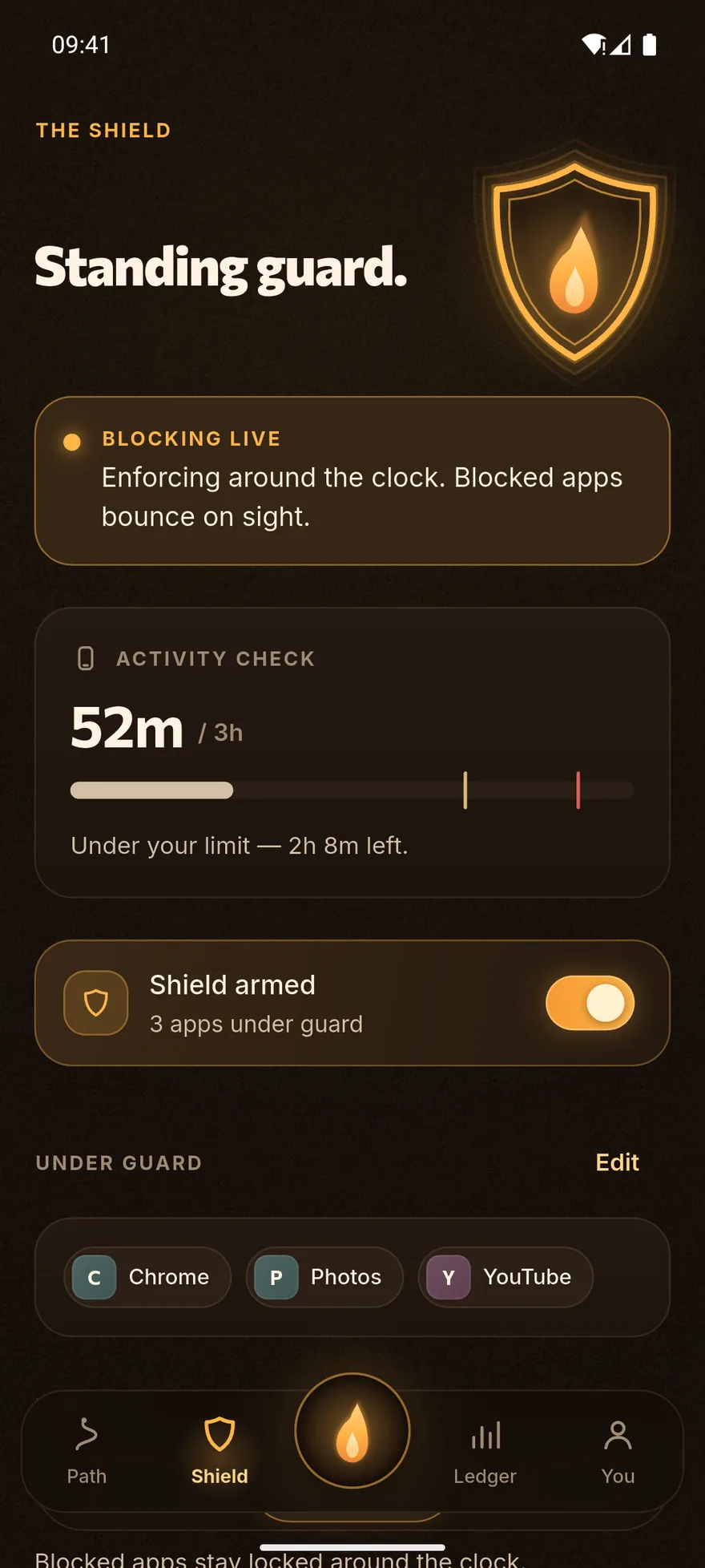
A blocked app does not open.
The Shield watches which app comes to the foreground. The moment one from your list appears, Android’s own home action fires and the app closes before it has finished loading. Then the explanation screen appears.
Four things arm the Shield
- During a focus session
- Blocked apps lock only while a session is running.
- Always on
- Blocked apps stay locked around the clock.
- On a schedule
- During the lockdown hours you choose. A window may cross midnight.
- Over your screen limit
- Cross your daily screen-time limit and guarded apps lock until you are back under it. Resets tomorrow.
-
Strict mode
While the Shield or a session is on, uninstalling the app is protected. Android Settings stays reachable, and the restriction is always tied to a hard deadline: a stale flag can never leave a phone locked.
-
Per-app daily limits
Separate from the blocklist. Each limited app’s foreground minutes are recomputed from usage events, so if the allowance runs out while you are mid-scroll, you are ejected right then. Locked until midnight.
-
Emergency calls are never blocked
Telephony, the emergency dialer and the device’s own default phone app open regardless of what is on the list.
The parent sets it. The device enforces it.
A parent signs up with an email address and proves it with a mailed code. The account is only created after that. The child joins by typing an 8-digit code or scanning a QR.
The parent sets
Parent
- Daily focus goal and screen-time limit
- Blocked apps (chosen from what is actually installed on the child’s device)
- Per-app time limits and the lockdown schedule
- Strict mode
- Lock Now: every blocked app closes until it is released
The Shield follows the rules you set.
On the child’s device
Child
- The settings are visible but not editable: “Set by your parent”
- The Shield enforces the parent’s list regardless of local settings
- Ending supervision is the parent’s decision
- Every monitoring service shows a permanent notification
-
The dashboard does not confuse “synced” with “working”
If a device has gone quiet, or the accessibility or usage-access permission has been switched off, the dashboard says so separately. A green light never hides dead enforcement.
-
Location: the current position only
A parent sees the last known position on a map and can ask “where are they now?”. The server keeps exactly one row per child: there is no route and no history table. Decline it and everything else still works.
-
Site history: domain names only
A local, on-device VPN reads DNS queries and records names like example.com: never page URLs, searches or messages. There is no remote VPN server, no traffic is routed anywhere, and nothing is blocked. Kept for 14 days.
-
Unlinking and deletion
Unlink a child and their synced statistics, position and site history are deleted immediately. Deleting a linked child account waits 48 hours and can be cancelled: supervision stays fully active throughout.
The numbers, as they are.
Screen time here is not an estimate. It is computed from Android’s raw usage events (foreground and background paired up, screen-off handled), which is why it matches Digital Wellbeing instead of the inflated totals most apps report.
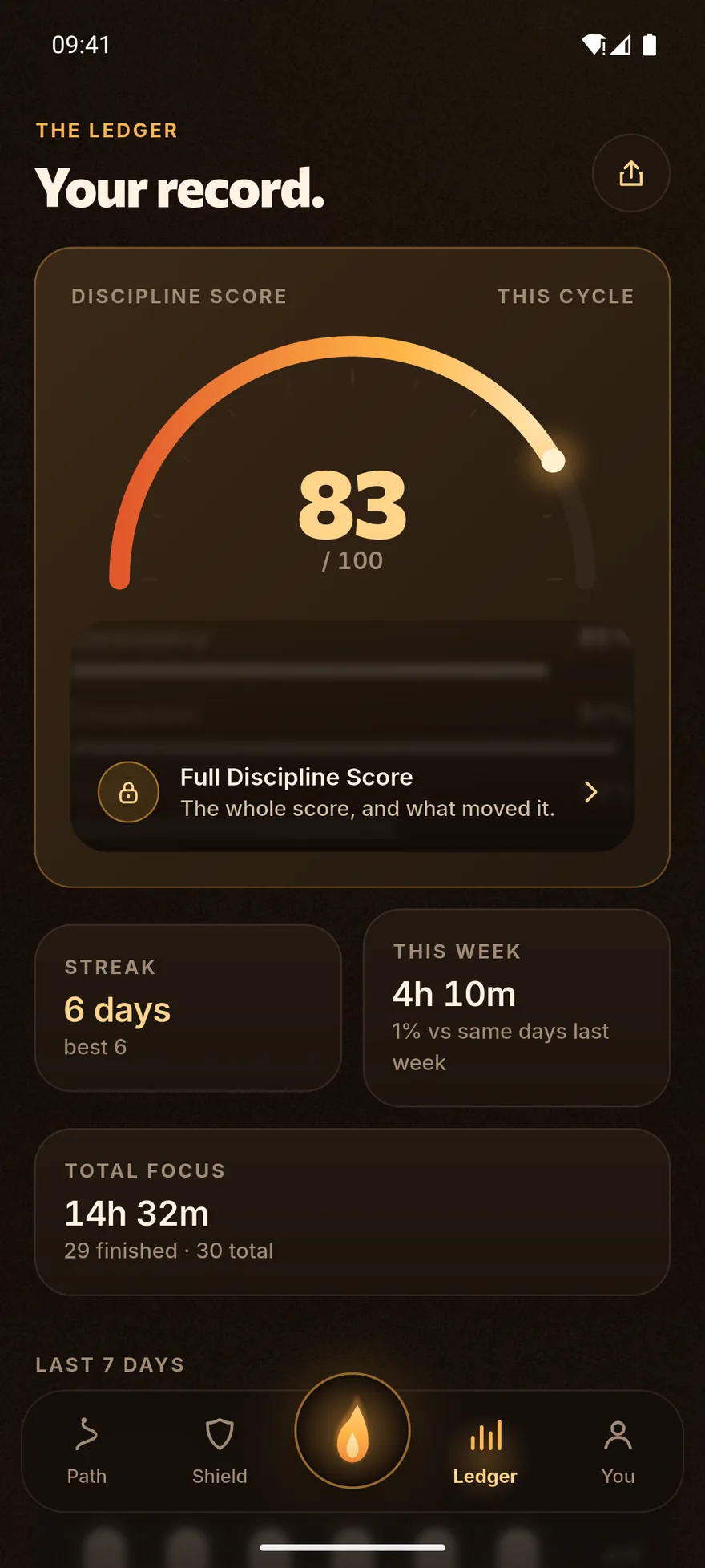
Discipline score
One number from 0 to 100, built from four parts. It only appears after at least three active days.
- Consistency 45
- Completion 25
- Streak 15
- Shield adherence 15
If no session ever offered a way around the Shield, that last part is removed and the score is recalculated over the rest. Missing data is never scored as either good or bad.
What we ask for, and why.
Fokus IO uses some of Android’s more sensitive permissions. Here is what each one is for. The app always shows an explanation screen before the system dialog.
| Permission | What it enables | Who is asked | Required |
|---|---|---|---|
| Accessibility service | The engine of the Shield. All it learns is which app came to the foreground. It does not read screen content. That is switched off in the service’s own configuration. | Anyone who wants blocking | For the Shield |
| Usage access | Screen time, top apps, per-app limits and the numbers in the Ledger. | Anyone using screen-time features | For screen time |
| Display over other apps | Makes the block screen appear instantly on stubborn phones. | Optional | No |
| Ignore battery optimisation | Stops Android quietly killing the Shield overnight. | Optional | No |
| Notifications | Three messages, no more: a session ending, an optional daily reminder, and the screen-limit warning. | Everyone | No |
| Foreground service | Keeps the process alive while a block is armed. Always shows a permanent notification. | Automatic | — |
| Camera | Scanning the parent’s QR link code. Nothing else. | The child, at link time | No, the code can be typed |
| Location | The parent’s map. Background access is requested separately, and only after foreground access is granted. | The child, optional | No |
| VPN | Site history. Entirely on-device: it reads DNS queries, forwards them unchanged, blocks nothing, and has no remote server. | The child, optional | No |
| Contacts | Friends only. Numbers are hashed on the device, matched in memory and discarded. Unreachable from a family account. | Solo users, optional | No |
| See the app list | Lets a parent choose from the apps actually installed on the child’s device, and lets the blocker compare the foreground app against that list. | Automatic | For parental control |
What is not in the app
- No analytics SDK
- No advertising SDK
- No third-party sharing
- No data sold
- One dependency on the server
What stays on the phone
Without Family Sync, your journey, sessions, settings, Shield configuration and most usage summaries never leave the device. Data is sent only when Family Sync (or Friends) is deliberately set up.
Read the privacy policyThe ones worth asking.
Is Fokus IO free?
There is a free tier, and it is a real one: the thirty-day path, focus sessions, blocking up to three apps and the basic screen-time figures cost nothing. No ads, and no data sold — that part has not changed. Optional paid plans unlock the rest.
What do the paid plans unlock?
On your own phone: unlimited blocked apps, daily per-app limits, blocking on a schedule, Strict Mode, and the full statistics — monthly heatmap, trends and complete session history. For a parent: the full dashboard, remote blocking with no cap, screen-time and per-app limits on the child’s device, schedules, device lock, location and site activity, and on the Family plan up to five children. Plans start at 2.99 AZN a month, with a cheaper yearly option; Google Play shows the exact price in your own currency before anything is charged.
What happens if a subscription ends?
Nothing you already set is switched off, and nothing gets stuck. A parent whose plan lapses keeps every control already running on their child’s device, and can always release them — unlock, unblock, lift a device lock, turn Strict Mode off, unlink — whether or not they are subscribed. What lapsing stops is setting up NEW paid controls until you subscribe again. A subscription must never be able to strand a child behind a lock their parent cannot lift.
Is there still a tip?
Yes, and it is separate from the plans. A one-off voluntary payment through Google Play that unlocks nothing at all; leaving it alone changes nothing.
Is it on Google Play?
Not yet. Fokus IO is in early beta and the store listing is still being prepared. That is why there is no store badge on this site: we are not going to put a button here that leads nowhere. Write in to join the beta.
Is there an iPhone version?
No. There is partial Screen Time work for iOS in the codebase, but parental controls, location, site history and the screen-time ledger do not exist there. Fokus IO is an Android app today.
What happens during a focus session?
A work block of the length you choose (5 to 240 minutes) starts, then a break, then the next round. If the Shield is on, the apps on your list will not open for the duration. Remaining time is always recomputed from a stored end timestamp, so even if the app is killed the session is replayed on next launch and the minutes are credited at the time they actually finished.
Do I need an account?
Not for solo use: no account, no email. An account is only needed for Family Sync or Friends.
Does it work offline?
Yes. The thirty days, sessions, the Shield and screen time all run entirely on the device. The internet is only needed for Family Sync and Friends.
Can a child switch supervision off?
A child cannot change the settings a parent set, and cannot end supervision on their own. But an ordinary Android app is limited in how much it can defend itself: turning off the accessibility permission or force-stopping the app will stop blocking. When that happens, it shows up on the parent’s dashboard.
Does site history read my traffic?
No. The VPN is local to the device and records only DNS queries, that is, domain names. Page URLs, search terms, messages and page content are never recorded. There is no remote VPN server. While recording is on, the device shows a permanent notification and the system VPN indicator.
Can I delete my data?
Yes. Settings → Danger Zone → Delete Account & Data. Parent and solo accounts are deleted immediately; a linked child account is deleted after 48 hours and can be cancelled during that window. If the app is no longer installed, you can ask by email instead.
What happens if I uninstall?
Everything held on the device (journey, sessions, settings) goes with it. Export a backup first and you can restore it on a new phone.
Light the first day.
Day 1 is one session away. Fokus IO is in early access on Android. Write in and you’re on the path.
Not on Google Play yet. The person who answers is the person who wrote the app. s.mohsunlu.dev@gmail.com
Where things stand
- Platform
- Android 7.0 and up
- Version
- 1.0.2
- Google Play
- In preparation
- Price
- Free tier, plans from 2.99 AZN a month
- Languages
- Azərbaycan, English, Русский